

Combined deployments
If your application requires compute (API) alongside object storage, you should select one of the following presets during the Choose a Preset step:- Webservice + StorageBucket
- Webservice + Database + StorageBucket
- Webservice + StorageBucket + Cache
- Webservice + Database + StorageBucket + Cache
Note: For all combined presets, the core configuration workflow is identical to a standard Web Service. This guide focuses specifically on the supplemental Storage Bucket settings described below.
1
Choose a Preset
Select the Storage Bucket tile for a standalone instance, or choose one of the combined presets listed above for full-stack deployments.
2
Storage — Environment Settings
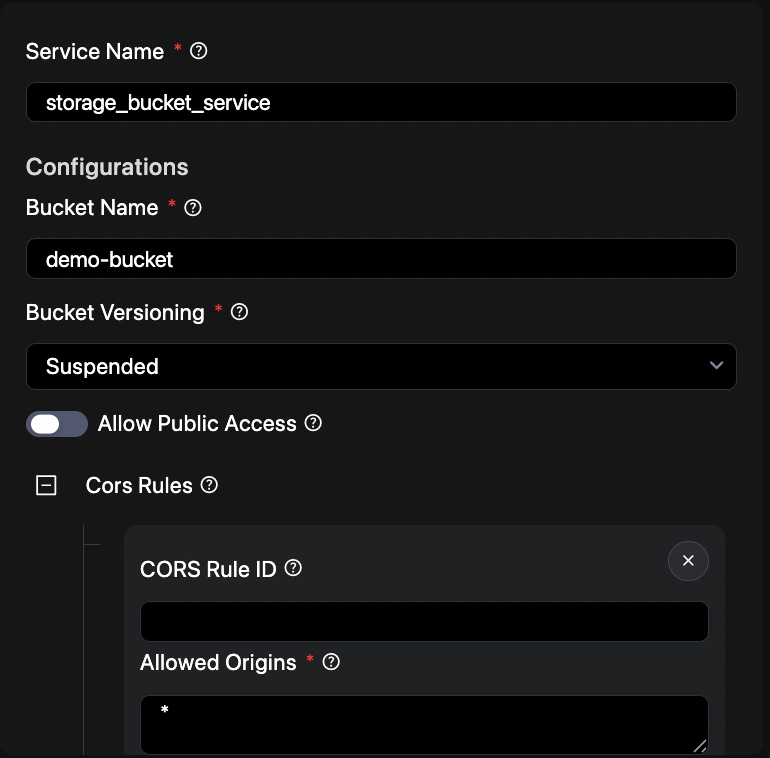
- Service Name — Enter a unique identifier for this storage service (e.g.,
app_assets). - Configurations
- Bucket Name — A unique name for your storage bucket.
- Bucket Versioning — Enable to keep multiple versions of an object in the same bucket.
- Enable Public Access — Toggle to allow public read access to objects via URL.
- CORS Rules — Define cross-origin resource sharing rules to allow web applications to access bucket contents safely.
Tip: Use public access only for files intended for direct browser consumption, like images or CSS assets.
Quick Reference: