> ## Documentation Index
> Fetch the complete documentation index at: https://docs.revolte.ai/llms.txt
> Use this file to discover all available pages before exploring further.
# Configure Pre-build Workflows
> Configure automated code reviews, quality checks, and summarization.
The **Prebuild Workflow** ensures that every Pull Request is analyzed for quality, risk, and compliance before it reaches the build stage.
## How to enable
Activate AI-native code reviews and quality gates for your repository.
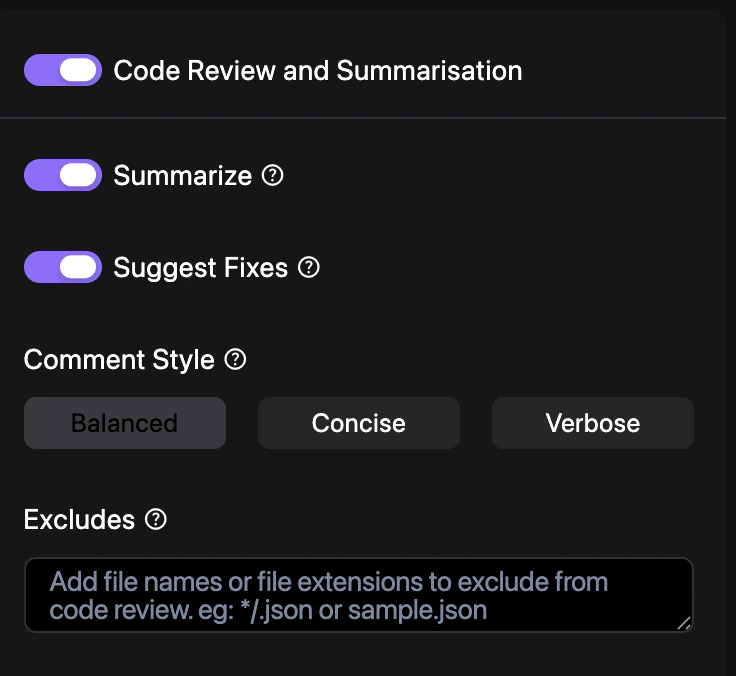
Navigate to **YAML Configuration** > **Repo Preferences** and locate the **Prebuild Workflow** section.
Toggle **Summarization** and **Fix Suggestions** based on your team's review requirements.
Enter a commit message and select your target branch to persist the changes. See [Syncing Changes](/yaml/syncing) for a detailed walkthrough.
## Pipeline controls
You can toggle specific checks within your `revolte.yaml`:
```yaml revolte.yaml theme={"dark"}
revolte:
version: "1.0"
project: Sideline HQ
appName: sideline-web-admin
config:
codeReview:
summarize: true
suggestFixes: true
commentStyle: Balanced
```
## Quick links
* [Agent Workflow](/yaml/repo-preferences/agent-workflow)
* [Preset & Service](/yaml/repo-preferences/preset-service)
* [YAML Overview](/yaml/overview)