> ## Documentation Index
> Fetch the complete documentation index at: https://docs.revolte.ai/llms.txt
> Use this file to discover all available pages before exploring further.
# Configure App & Branch Settings
> Configure your application framework and environment branch mapping.
## How to configure
Follow these steps to define your application identity and branch strategy.
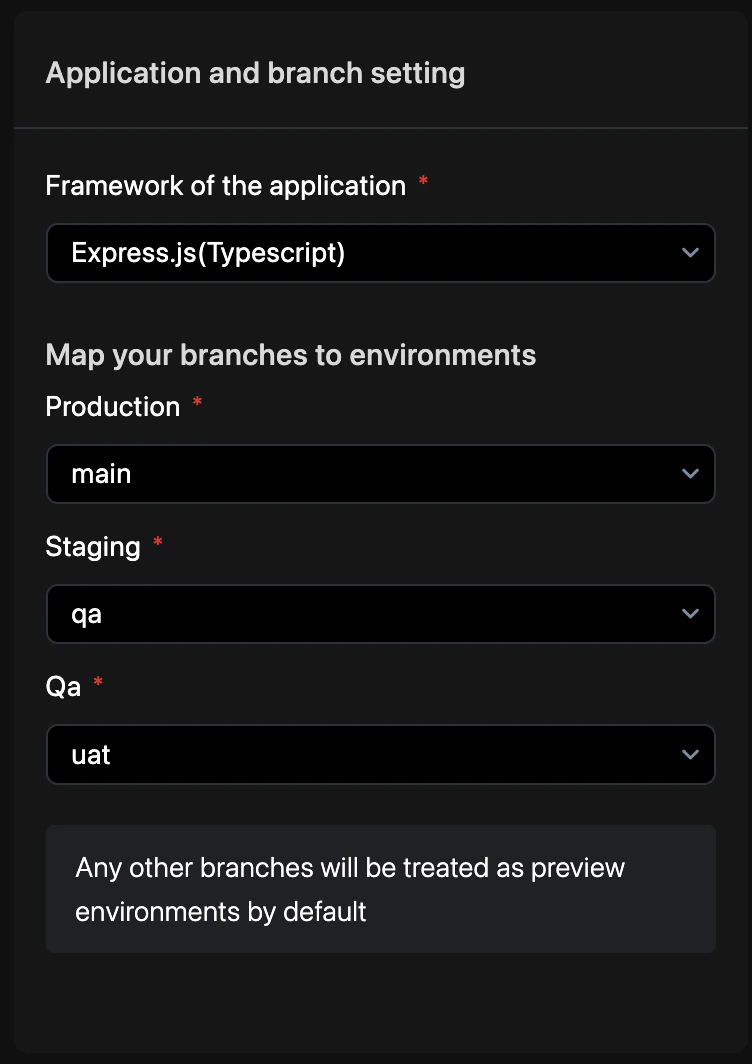
Navigate to **YAML Configuration** > **Repo Preferences** from your project dashboard.
Assign specific Git branches to your **Production**, **UAT**, and **QA** environments.
Enter a commit message and select your target branch to persist the changes. See [Syncing Changes](/yaml/syncing) for a detailed walkthrough.
## Branch mapping
Map your Git branches to Revolte environments to enable automated deployments.
| Git Branch | Revolte Environment | Behavior |
| -------------- | ------------------- | ---------------------------------------------------------------------------------------------------------------- |
| `main` | **Production** | Live production traffic and primary rollout target. |
| `staging` | **UAT** | Pre-production validation and user acceptance testing. |
| `qa` | **QA** | Automated testing and quality assurance cycles. |
| \* (Any other) | **Preview** | Ephemeral environments with a default 3-day retention period Customizable . |
```yaml revolte.yaml theme={"dark"}
revolte:
version: "1.0"
project: Demo-Project
appName: "demo-app"
env:
production:
branch: main # Maps production environment to the main branch
staging:
branch: staging # Maps UAT environment to the staging branch
qa:
branch: qa # Maps QA environment to the qa branch
```
**How to Customize Preview Expiry:**
By default, Preview environments automatically destroy themselves after 3 days. To adjust this lifespan:
1. Open your project dashboard and select **Settings** from the left navigation bar.
2. Navigate to **General Settings** > **Preview environment expiry**.
3. Enter your preferred duration, select the unit (**Day** or **Hour**), and click **Update**.
*Note: This applies to upcoming deployments only.*
## Service integration
Branch mapping triggers automated deployments for all services in the environment.
```yaml revolte.yaml theme={"dark"}
revolte:
env:
production:
branch: main
services:
rid_1:
type: WEB_SERVICE
name: api-gateway
# Revolte deploys this service when code is pushed to 'main'
```
## Quick links
* [Agent Workflow](/yaml/repo-preferences/agent-workflow)
* [Prebuild Workflow](/yaml/repo-preferences/prebuild-workflow)
* [YAML Overview](/yaml/overview)