> ## Documentation Index
> Fetch the complete documentation index at: https://docs.revolte.ai/llms.txt
> Use this file to discover all available pages before exploring further.
# Understanding Revolte YAML
> Define and manage your entire application lifecycle through a single version-controlled configuration file.
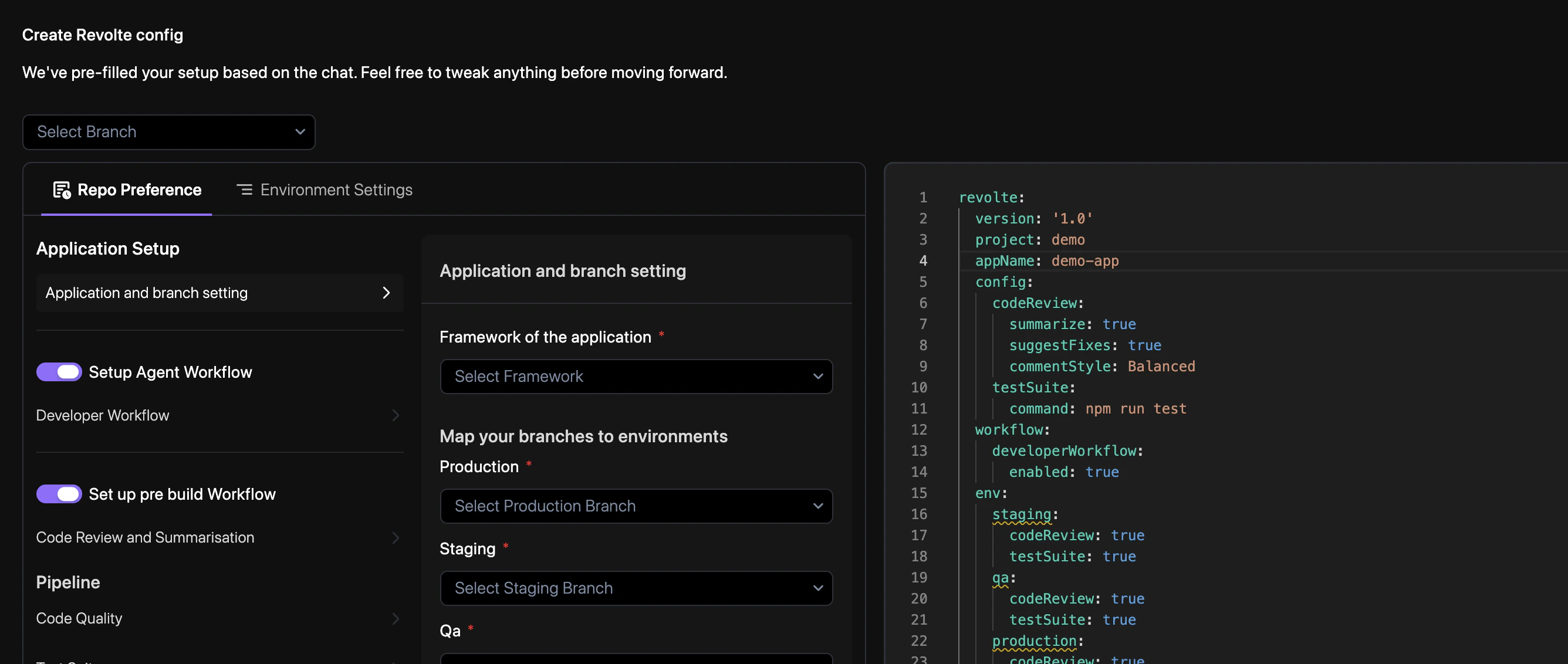
Manage your entire application lifecycle, infrastructure, and deployment logic through a single version-controlled `revolte.yaml` file.
 ***
## Reference example
```yaml revolte.yaml {expandable} theme={"dark"}
revolte:
version: "1.0"
project: Demo-Project
appName: demo application
# Global Configuration & AI Workflows
config:
codeReview:
summarize: true
suggestFixes: true
commentStyle: Balanced
codeQuality:
codeStyle:
rules:
javascript/arrayCallbackReturn: warn
testSuite:
command: npm run test
automationTestSuite:
command: npm run test:automation
workflow:
developerWorkflow:
enabled: true
# Environment-specific Overrides
env:
production:
branch: main
codeReview: true
codeQuality: true
testSuite: true
automationTestSuite: true
services:
rid_1:
type: WEB_SERVICE
name: web_service
entryPoint: index.js
properties:
health: /health
port: 8080
loadBalancerMode: dedicated
variables:
BASE_URL: /api/v1
JWT_TOKEN_SECRET: "#{JWT_TOKEN_SECRET}"
SESSION_SECRET: "#{SESSION_SECRET}"
insights:
cpu:
- cpu_time_idle
- cpu_time_user
- cpu_time_system
swap:
- swap_used
mem:
- mem_total
- mem_free
disk:
- disk_used
- disk_total
- disk_free
specifications:
cpu: 2
memory: 1
storage: 30
autoScaling:
replica:
min: 1
max: 1
utilization:
cpu:
target: 70
memory:
target: 70
behavior:
scaleDown:
stabilizationWindow: 300
staging:
branch: staging
codeReview: true
codeQuality: true
testSuite: true
automationTestSuite: true
services:
rid_1:
type: WEB_SERVICE
name: web_service
entryPoint: index.js
properties:
health: /health
port: 8080
loadBalancerMode: dedicated
variables:
BASE_URL: /api/v1
specifications:
cpu: 2
memory: 1
storage: 30
qa:
branch: qa
codeReview: true
codeQuality: true
testSuite: true
automationTestSuite: true
services:
rid_1:
type: WEB_SERVICE
name: web_service
entryPoint: index.js
properties:
health: /health
port: 8080
loadBalancerMode: shared
variables:
BASE_URL: /api/v1
specifications:
cpu: 2
memory: 1
storage: 30
# Ephemeral Preview Environments
preview:
codeReview: true
codeQuality: true
testSuite: true
automationTestSuite: true
services:
rid_1:
type: WEB_SERVICE
name: web_service
entryPoint: index.js
properties:
health: /health
port: 8080
loadBalancerMode: dedicated
variables:
BASE_URL: /api/v1
specifications:
cpu: 2
memory: 1
storage: 30
```
**Key Configuration Highlights:**
* `loadBalancerMode: dedicated` provisions a dedicated load balancer instead of shared routing.
* `developerWorkflow.enabled` activates Revolte's developer-centric automation workflow.
* `autoScaling` automatically adjusts service replicas based on CPU and memory utilization thresholds.
* `variables` defines environment variables injected into your runtime. Use `#{SECRET_NAME}` to reference Revolte secrets securely.
* `insights` enables granular telemetry collection (CPU, Memory, Disk, Swap) for deep runtime observability and AI-driven performance analysis.
***
## How it works
Place the `revolte.yaml` file in your repository root. Revolte automatically detects this file
upon repository connection.
**Commit to Sync:** Any subsequent changes to your `revolte.yaml` file must be committed and pushed to your repository for the Revolte engine to recognize and apply the latest configuration.
Specify your service types (Web Service, Database, Cron Job) and their respective resource
requirements.
Assign Git branches to target environments. Pushing code to these branches triggers the
corresponding deployment workflow.
The Revolte AI engine parses your YAML to provision infrastructure, configure load balancers,
and set up observability dashboards.
***
## Related
* [Repository Preferences](/yaml/repo-preferences/overview)
* [Environment Settings](/yaml/environment-settings/services)
* [Deployments](/deployments/services/overview)
* [Integrations](/integrations/cloud/overview)
***
## Reference example
```yaml revolte.yaml {expandable} theme={"dark"}
revolte:
version: "1.0"
project: Demo-Project
appName: demo application
# Global Configuration & AI Workflows
config:
codeReview:
summarize: true
suggestFixes: true
commentStyle: Balanced
codeQuality:
codeStyle:
rules:
javascript/arrayCallbackReturn: warn
testSuite:
command: npm run test
automationTestSuite:
command: npm run test:automation
workflow:
developerWorkflow:
enabled: true
# Environment-specific Overrides
env:
production:
branch: main
codeReview: true
codeQuality: true
testSuite: true
automationTestSuite: true
services:
rid_1:
type: WEB_SERVICE
name: web_service
entryPoint: index.js
properties:
health: /health
port: 8080
loadBalancerMode: dedicated
variables:
BASE_URL: /api/v1
JWT_TOKEN_SECRET: "#{JWT_TOKEN_SECRET}"
SESSION_SECRET: "#{SESSION_SECRET}"
insights:
cpu:
- cpu_time_idle
- cpu_time_user
- cpu_time_system
swap:
- swap_used
mem:
- mem_total
- mem_free
disk:
- disk_used
- disk_total
- disk_free
specifications:
cpu: 2
memory: 1
storage: 30
autoScaling:
replica:
min: 1
max: 1
utilization:
cpu:
target: 70
memory:
target: 70
behavior:
scaleDown:
stabilizationWindow: 300
staging:
branch: staging
codeReview: true
codeQuality: true
testSuite: true
automationTestSuite: true
services:
rid_1:
type: WEB_SERVICE
name: web_service
entryPoint: index.js
properties:
health: /health
port: 8080
loadBalancerMode: dedicated
variables:
BASE_URL: /api/v1
specifications:
cpu: 2
memory: 1
storage: 30
qa:
branch: qa
codeReview: true
codeQuality: true
testSuite: true
automationTestSuite: true
services:
rid_1:
type: WEB_SERVICE
name: web_service
entryPoint: index.js
properties:
health: /health
port: 8080
loadBalancerMode: shared
variables:
BASE_URL: /api/v1
specifications:
cpu: 2
memory: 1
storage: 30
# Ephemeral Preview Environments
preview:
codeReview: true
codeQuality: true
testSuite: true
automationTestSuite: true
services:
rid_1:
type: WEB_SERVICE
name: web_service
entryPoint: index.js
properties:
health: /health
port: 8080
loadBalancerMode: dedicated
variables:
BASE_URL: /api/v1
specifications:
cpu: 2
memory: 1
storage: 30
```
**Key Configuration Highlights:**
* `loadBalancerMode: dedicated` provisions a dedicated load balancer instead of shared routing.
* `developerWorkflow.enabled` activates Revolte's developer-centric automation workflow.
* `autoScaling` automatically adjusts service replicas based on CPU and memory utilization thresholds.
* `variables` defines environment variables injected into your runtime. Use `#{SECRET_NAME}` to reference Revolte secrets securely.
* `insights` enables granular telemetry collection (CPU, Memory, Disk, Swap) for deep runtime observability and AI-driven performance analysis.
***
## How it works
Place the `revolte.yaml` file in your repository root. Revolte automatically detects this file
upon repository connection.
**Commit to Sync:** Any subsequent changes to your `revolte.yaml` file must be committed and pushed to your repository for the Revolte engine to recognize and apply the latest configuration.
Specify your service types (Web Service, Database, Cron Job) and their respective resource
requirements.
Assign Git branches to target environments. Pushing code to these branches triggers the
corresponding deployment workflow.
The Revolte AI engine parses your YAML to provision infrastructure, configure load balancers,
and set up observability dashboards.
***
## Related
* [Repository Preferences](/yaml/repo-preferences/overview)
* [Environment Settings](/yaml/environment-settings/services)
* [Deployments](/deployments/services/overview)
* [Integrations](/integrations/cloud/overview)