> ## Documentation Index
> Fetch the complete documentation index at: https://docs.revolte.ai/llms.txt
> Use this file to discover all available pages before exploring further.
# Manage Databases
> Provision PostgreSQL, MySQL, and MongoDB services with backups and connection policies.
## Supported engines
| Engine | Description |
| ---------- | -------------------------------------------------------------------------- |
| PostgreSQL | Recommended relational database for most applications |
| MySQL | MySQL-compatible relational workloads |
| MongoDB | Flexible document-based storage Coming Soon |
## Example configuration
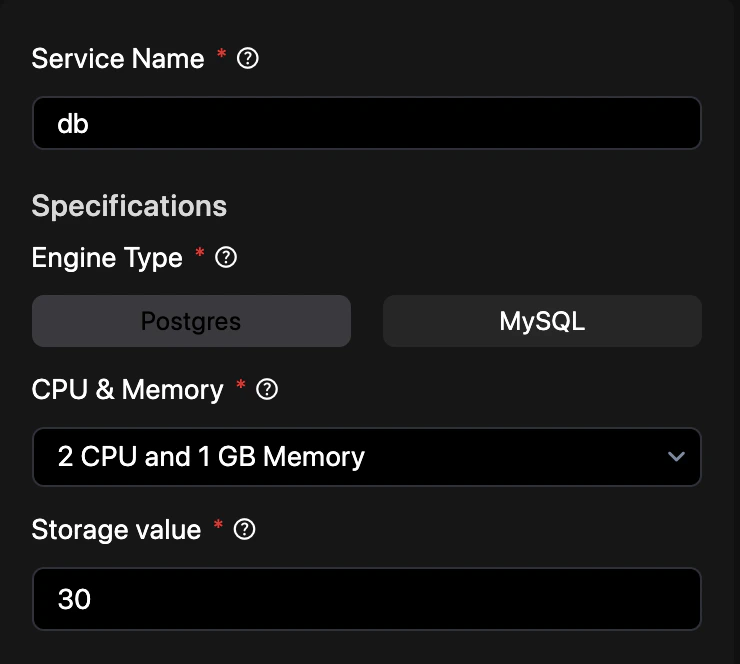
Define your database service in `revolte.yaml` to configure engines, versions, storage, and backup policies manually.
{`revolte:
version: '1.0'
project: Demo-Project
appName: demo-app
env:
production:
branch: main
services:
rid_8:
type: DATABASE
name: db
specifications:
cpu: 2
memory: 1
storage: 30
engine: postgres`}
## Deployment templates
Preconfigured deployment patterns for database-backed services.
* [Web Service + Database](/guides/deployments/database)
* [Web Service + Database + Cache](/guides/deployments/cache)
* [Web Service + Database + Storage Bucket](/guides/deployments/storage)
* [Web Service + Database, Cache, and Storage Bucket](/guides/deployments/presets)
## Database Connection Injection
Provisioning a database service (e.g., named `db` under your YML services configuration) automatically injects the corresponding connection credentials into the environment variables of all other services within the same environment.
This requires no manual secret configuration. The following environment variables are automatically injected at runtime:
```yaml theme={"dark"}
DATABASE_HOST: '#{db.dbUrl}'
DATABASE_PORT: '#{db.dbPort}'
DATABASE_USERNAME: '#{db.dbUsername}'
DATABASE_PASSWORD: '#{db.dbPassword}'
DATABASE_NAME: '#{db.dbName}'
```
*(Note: Replace `db` with the exact name of your database service as declared under `services` in your `revolte.yaml`)*
## Related
* [Database Explorer](/deployments/services/databases/connect)
* [Web Services](/deployments/services/web-services)
* [Cache](/deployments/services/cache)
* [Environment Settings](/yaml/environment-settings/services)
* [Secrets](/deployments/services/secrets)
* [Observability](/deployments/observability)